ZEEROmed Chrome Extension
The ZEEROmed Chrome Extension is a browser extension capable of handling VIEW’s multimonitor requests, automatically handling windows' positions and bounds. By implementing some simple JavaScript APIs, any web-based third-party system will be able to open VIEW’s windows on the selected exam without the need to manage any window's placement.
Installation
To install the ZEEROmed Chrome Extension, the user will need to go to this Chrome Web Store link and proceed with the usual installation of an extension. If required, the user will need to give the extension all the necessary permissions to make it work as expected.
If the installation ends successfully, the ZEEROmed Chrome Extension will be ready out of the box, without any additional configuration: this means that the APIs described below will be made available within the window object of the web-based third-party system.
APIs
The ZEEROmed Chrome Extension offers two JavaScript APIs: openViewerWindows and closeViewerWindows.
Open the VIEW’s windows - openViewerWindows
Using this JavaScript API, the web-based third-party system will be able to open 1 or 2 VIEW’s Chrome windows on the requested exam. In addition, every VIEW window previously opened will be closed before opening the requested ones.
The windows’ management will be handled directly by the extension as long as not explicitly requested otherwise. The positions will be stored, reused at each opening event, and updated at each position change or resize event.
No personal information is stored during the windows' positioning process.
The API returns undefined while accepting only one object parameter, which must contain the following fields:
baseUrl: {string, required} base URL of the VIEW; e.g.
https://viewer.demo.zeeromed.cloud(the extension will automatically append/ngv/multimonitor-apito the baseUrl when sending requests to the viewer)request: {object, required} request object, used to provide opening parameters. A list of the supported parameters can be found here. If a parameter must be repeated (e.g.: studyInstanceUid, fullPreloadStudy) then it is necessary to pass it as a strings array;
numberOfMonitors: {number, required} number of monitors to open, only 1 and 2 are supported;
authHeader: {string, required} authorization header of the VIEW.
It is possible to add the optional field bounds to the parameters object, used to override the opening windows' positions and dimensions. The bounds object must contain the following parameters:
primary: {object, required if parameter
boundsis provided} bounds of the primary monitor;height: {number, required} height of the VIEW’s window;
left: {number, required} x coordinate of the upper-left corner of the VIEW’s window;
top: {number, required} y coordinate of the upper-left corner of the VIEW’s window;
width: {number, required} width of the VIEW’s window;
secondary: {object, required if parameter
boundsis provided andnumberOfMonitorsis 2} bounds of the secondary monitor;height: {number, required} height of the VIEW’s window;
left: {number, required} x coordinate of the upper-left corner of the VIEW’s window;
top: {number, required} y coordinate of the upper-left corner of the VIEW’s window;
width: {number, required } width of the VIEW’s window.
The API can be therefore used as shown in the following examples:
// this example will let the ZEEROmed chrome extension handle the windows' positioning
const params = {
  baseUrl: "<protocol>://<VIEW's base URL>",
  request: {
    username: "User",
    role: "Role",
    patientId: "NO_ID",
    idIssuer: "NONE",
    studyInstanceUid: "1.2.826.0.1.3680043.9.6116.181913404117131616172218",
  },
  numberOfMonitors: 2,
  authHeader: "<VIEW's Authorization header>"
};

window.openViewerWindows(params);

// this example let the calling web-based third-party system handle the windows' positioning
const params = {
  baseUrl: "<protocol>://<VIEW's base URL>",
  request: {
    username: "User",
    role: "Role",
    patientId: "NO_ID",
    idIssuer: "NONE",
    studyInstanceUid: "1.2.826.0.1.3680043.9.6116.181913404117131616172218",
  },
  numberOfMonitors: 2,
  authHeader: "<VIEW's Authorization header>",
  bounds: {
    primary: {
      height: 900,
      width: 1440,
      left: 0,
      top: 0,
    },
    secondary: {
      height: 1080,
      width: 1920,
      left: -1920,
      top: 0,
    },
  },
};

window.openViewerWindows(params);
Closing the VIEW’s windows - closeViewerWindows
This API will let the web-based third-party system programmatically decide whether to close any previously opened VIEW windows. The API returns undefined and accepts no arguments.
window.closeViewerWindows();Debugging
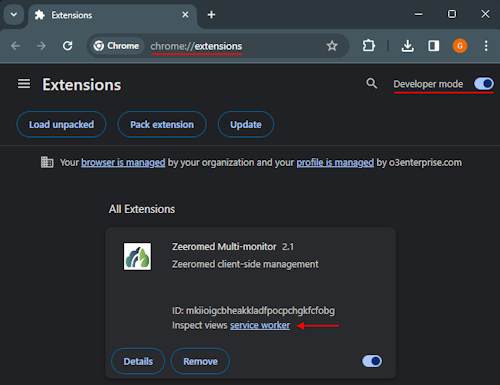
It is possible to inspect the Zeeromed Chrome Extension logs to check for errors.
Open the Chrome Extensions page by writing chrome://extensions in the URL bar and enable the “Developer mode”, then click on the “service worker” link inside the Zeeromed Multi-monitor extension box: